
We're excited to introduce the new SNA Member Portal—a more user-friendly experience designed to make managing your membership easier. Read the FAQs and watch the how-to videos below, organized by user type, to learn more about the portal and the features available to you.
Please note: This page will be updated regularly to help you navigate the new portal as features are introduced and additional information becomes available.
SAE / State Leaders
As an SNA State Leader or SAE, you play a key role in supporting members across your state. The new Member Portal provides access to membership management tools, state reports, rosters, and resources designed to help you serve your members more effectively. Explore the FAQs and training videos below to learn about new features, key updates, and what to expect during the transition.
Member Portal Guide
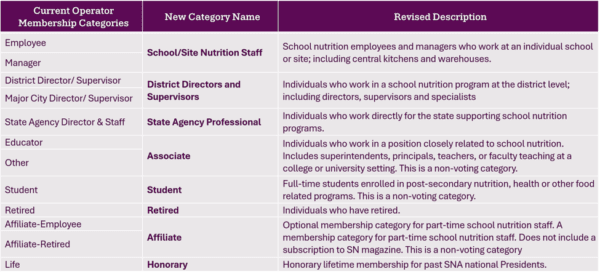
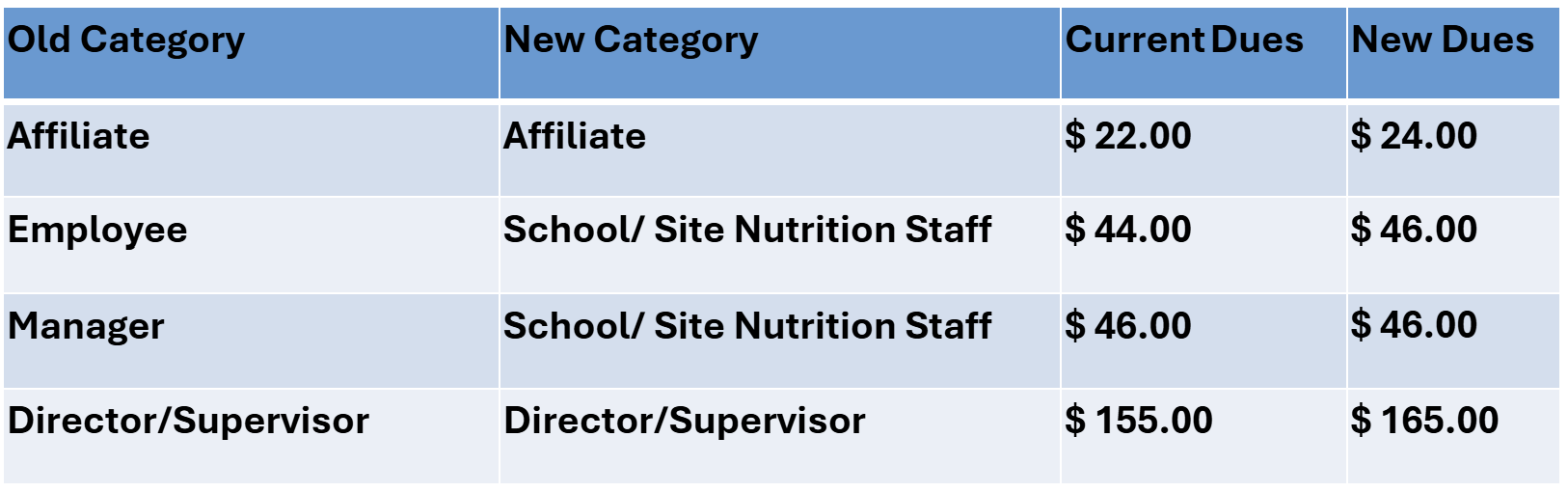
Membership Model Transition
GETTING STARTED IN THE NEW PORTAL
Accessing and Downloading State Rosters
Accessing and Downloading Reports
Member Portal Video Tutorials
Watch these short tutorials to learn how to navigate the new Member Portal, update your profile, manage your membership, and access member benefits and resources. These step-by-step videos will help you get started and make the most of your SNA membership experience.